{typeof hasUnsavedChanges !== "undefined" && (
You have{" "}
{hasUnsavedChanges ? "not saved" : "saved"}
{" "}
your changes.
)}
);
}
```
And here is the form in use:

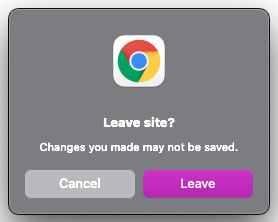
If the user closes the tab without saving their name first, we want to show a confirmation dialog that looks similar to this:
## Custom hook solution
We'll create a hook named `useConfirmTabClose` that will show the dialog if the user tries to close the tab when `hasUnsavedChanges` is `true`. We can use it in our component like this:
```jsx
const NameForm = () => {
const [name, setName] = React.useState("");
const [hasUnsavedChanges, setHasUnsavedChanges] = React.useState(undefined);
useConfirmTabClose(hasUnsavedChanges);
// ...
}
```
We can read this hook as "confirm the user wants to close the tab if they have unsaved changes."
## Showing the confirmation dialog
To implement this hook, we need to know when the user has closed the tab and show the dialog. We can add an event listener for the `beforeunload` event to detect when the window, the document, and the document's resources are about to be unloaded (see [References](#references) for more information about this event).
The event handler that we provide can tell the browser to show the confirmation dialog. The way this is implemented varies by browser, but I've found success on Chrome and Safari by assigning a non-empty string to `event.returnValue` and also by returning a string. For example:
```js
const confirmationMessage = "You have unsaved changes. Continue?";
const handleBeforeUnload = (event) => {
event.returnValue = confirmationMessage;
return confirmationMessage;
}
window.addEventListener("beforeunload", handleBeforeUnload);
```
_Note: The string returned or assigned to `event.returnValue` may not be shown in the confirmation dialog as that feature is deprecated and not widely supported. Also, the way that we indicate that the dialog should be opened is not consistently implemented across browsers. According to MDN, the spec states that the event handler should call `event.preventDefault()` to show the dialog, though Chrome and Safari don't seem to respect this._
## Hook implementation
Now that we know how to show the confirmation dialog, let's start creating the hook. We'll take one argument, `isUnsafeTabClose`, which is some boolean value that should tell us if we should show the confirmation dialog. We'll also add the `beforeunload` event listener in an `useEffect` hook and ensure that we remove the event listener once the component has unmounted:
```js
const confirmationMessage = "You have unsaved changes. Continue?";
const useConfirmTabClose = (isUnsafeTabClose) => {
React.useEffect(() => {
const handleBeforeUnload = (event) => {};
window.addEventListener("beforeunload", handleBeforeUnload);
return () =>
window.removeEventListener("beforeunload", handleBeforeUnload);
}, [isUnsafeTabClose]);
};
```
We know that we can assign `event.returnValue` or return a string from the `beforeunload` handler to show the confirmation dialog, so in `handleBeforeUnload` we can simply do that if `isUnsafeTabClose` is `true`:
```js
const confirmationMessage = "You have unsaved changes. Continue?";
const useConfirmTabClose = (isUnsafeTabClose) => {
React.useEffect(() => {
const handleBeforeUnload = (event) => {
if (isUnsafeTabClose) {
event.returnValue = confirmationMessage;
return confirmationMessage;
}
}
// ...
}
```
Putting those together, we have the final version of our hook:
```js
const confirmationMessage = "You have unsaved changes. Continue?";
const useConfirmTabClose = (isUnsafeTabClose) => {
React.useEffect(() => {
const handleBeforeUnload = (event) => {
if (isUnsafeTabClose) {
event.returnValue = confirmationMessage;
return confirmationMessage;
}
};
window.addEventListener("beforeunload", handleBeforeUnload);
return () =>
window.removeEventListener("beforeunload", handleBeforeUnload);
}, [isUnsafeTabClose]);
};
```
## Final component
Here is the final version of `NameForm` after adding our custom hook:
```jsx
const NameForm = () => {
const [name, setName] = React.useState("");
const [hasUnsavedChanges, setHasUnsavedChanges] = React.useState(undefined);
useConfirmTabClose(hasUnsavedChanges);
const handleChange = (event) => {
setName(event.target.value);
setHasUnsavedChanges(true);
};
return (
{typeof hasUnsavedChanges !== "undefined" && (
You have{" "}
{hasUnsavedChanges ? "not saved" : "saved"}
{" "}
your changes.
)}
);
}
```
## Conclusion
In this post, we used the `beforeunload` event to alert the user when closing a tab with unsaved changes. We created `useConfirmTabClose`, a custom hook that adds and removes the `beforeunload` event handler and checks if we should show a confirmation dialog or not.
## References
* [MDN | BeforeUnloadEvent](https://developer.mozilla.org/en-US/docs/Web/API/BeforeUnloadEvent#examples)
* [MDN | Window: beforeunload event](https://developer.mozilla.org/en-US/docs/Web/API/Window/beforeunload_event)
* [MDN | WindowEventHandlers.onbeforeunload](https://developer.mozilla.org/en-US/docs/Web/API/WindowEventHandlers/onbeforeunload)
Cover photo by